


„Started with a leaf. Twenty minutes later we were looking at my sleeve, the dish towel and a cracker.“
BEYERSWERK NORDIKIDSSCOPE · KIDS’ DIGITAL MICROSCOPE
Give their curiosity a closer look.
A leaf. A feather. The sleeve of their favorite shirt. NordiKidsScope turns familiar things into something worth a second look—with a built-in screen, adjustable light, and photos to revisit together.


1 / 10
More than 38,000 customers trust Beyerswerk


$79.00 $112.86Winter offer · 30% off
Free US shipping. Applicable taxes calculated at checkout.
- A new way to explore
Discover surface details in everyday objects, indoors or outside. - See it on the screen
Built-in 2.0-inch IPS display—no phone needed for viewing. - USB-C rechargeable
Built-in battery—no disposable batteries to buy or replace. - Keep their discoveries
A compatible microSD card is required to save photos and videos. Add a 32GB card in step 3, or use your own.
Free US shipping
30-day money-back
Secure payment
„I helped with the focus the first time. By the second time he wanted me to just watch.“
„Got one for each kid in different colors. Best decision I made. Zero fighting over turns.“
How does it work?
Place the microscope over a flat sample, hold it steady, and turn the side focus wheel until the image is clear. Adjust the light to suit the surface.
Do I need a memory card?
A compatible microSD card is required to save photos and videos. If you do not have a suitable card at home, add compatible 32GB cards in step 3: one for $12.32, two for $23.64, or three for $34.46. The two-card price includes an extra $1.00 off; the three-card price includes an extra $2.50 off. Choose one per microscope you want to save with. Cards are sold separately.
What comes with each microscope?
One microscope in your chosen color, a USB charging cable, a lanyard, and instructions. Memory cards are included only in the quantity selected in step 3.
How is it shipped?
Free US shipping is included with every package. Final delivery estimates and applicable taxes appear at checkout.
- Built-in display2.0-inch viewing
- Photo & videoSave what they find
- Adjustable LEDsLight the sample
- USB-C rechargeableNo disposable batteries
↑ Change selectionNordiKidsScope Kids' Digital Microscope$79.00
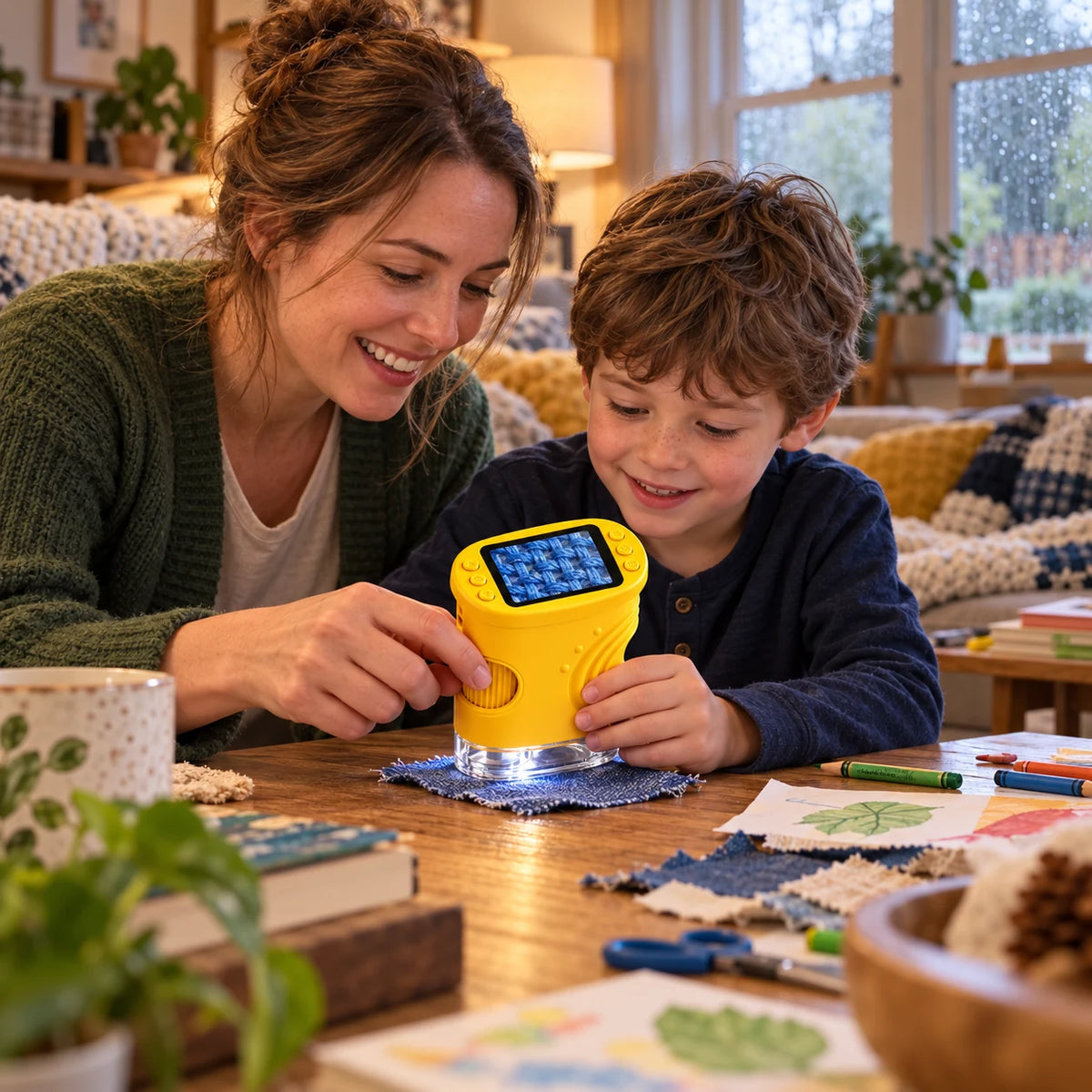
THEIR WORLD HAS MORE TO SHOW THEM
The next adventure can start at your kitchen table.
You don’t need a complicated science kit or a special trip. Start with something your child already knows: a leaf from the yard, a piece of fabric, or a smooth stone. Then take a closer look together. Familiar objects become a reason to notice, compare, and ask another question.
- Real things to investigate: Start with everyday surfaces around your home.
- Time together: Let their questions lead the next discovery.
WATCH IT COME INTO FOCUS
Place it down. Turn the wheel. Look closer.
The clear base helps you position the microscope over your sample. Keep it still and turn the focus wheel slowly. The picture changes as you adjust it, so your child can see what a sharper view looks like.
- Manual focus: A simple adjustment you can make together.
- Adjustable LED light: Change the illumination to suit the sample.
PHOTOS & EVERYDAY EXPLORING
Little discoveries. Everyday places.
Emily R.
 Review photo
Didn’t even make it to the tableThe box was barely open and she was already asking how to turn it on. We charged it over lunch with the USB-C cable and looked at a leaf from the yard right after. No batteries to hunt for, which I love.
Marcus T.
 Review photo
Go slow on the wheelAll we saw at first was a blur. Turns out I was spinning the focus wheel way too fast. Small turns and suddenly the threads in her jeans were sharp on the screen. She still hands it to me when it gets fuzzy, and that’s fine.
Sarah L.
 Review photo
Her own crayon drawingHer idea, not mine. She put it right on one of her drawings and yelled for me to come look at the crayon. I like that we can both see the screen at the same time instead of taking turns at an eyepiece.
Lauren B.
 Review photo
She picked pinkBirthday gift, and it’s the one she keeps going back to. Right now it lives on her bed next to a little pile of stuff she’s “saving to look at later.”
Ben H.
 Review photo
Has its own spot nowIt sits on the low shelf so he can grab it himself. I still sit with him when he uses it, he’s five. Only knocked off a star because I wish the cable were a bit longer.
Grace N.
 Review photo
A piece of stringHe walked up with a piece of string and asked if we could look at it. That’s the photo. I didn’t expect the boring stuff around the house to be the big hit.
More experiences
A SCREEN MADE FOR SHARING
“Come and see this!” is part of the fun.
The picture appears on the microscope’s own 2.0-inch IPS display. Your child can look without peering through a tiny eyepiece, then show you what caught their attention. No phone is needed for this everyday viewing.
- Built-in display: See the live image right on the device.
- Look together: Talk about shapes, patterns, and textures.

SAVE SOMETHING WORTH SHOWING
Keep the discovery. Share the excitement.
Take a photo or record a video, then return to it later. Compare different samples, collect favorites, or show someone what you found. A compatible microSD card is required to save photos and videos. Add our compatible 32GB card or use a suitable card you already own.
- Photos and videos: Build a little collection of observations.
- Optional storage: Choose your card quantity in step 3, or use compatible cards you already own.
MAKE ROOM FOR A BIGGER LOOK
Bring the view to a computer.
Want everyone to see? Connect NordiKidsScope by USB to a compatible computer and open the camera software. Move from one tiny detail to the next—and watch it appear on the bigger screen as you explore. Computer viewing needs compatible software; you may need to download and install it first.
- USB connection: Move from handheld exploration to a shared screen.
- Just for computer viewing: Check the manual for supported operating systems and setup instructions.
READY FOR THE NEXT LOOK
Recharge it. Pick another sample.
A rechargeable design makes NordiKidsScope easy to bring from the table to the backyard. Use the included USB cable for charging and keep the microscope dry while exploring. An adult should supervise charging and use.
- Portable by design: No power cord needed while exploring.
- USB cable included: Recharge before your next activity.
MORE THAN ONE WAY TO EXPLORE
At home. In the yard. Together.
Start small, follow their questions, and see where the next sample takes you.
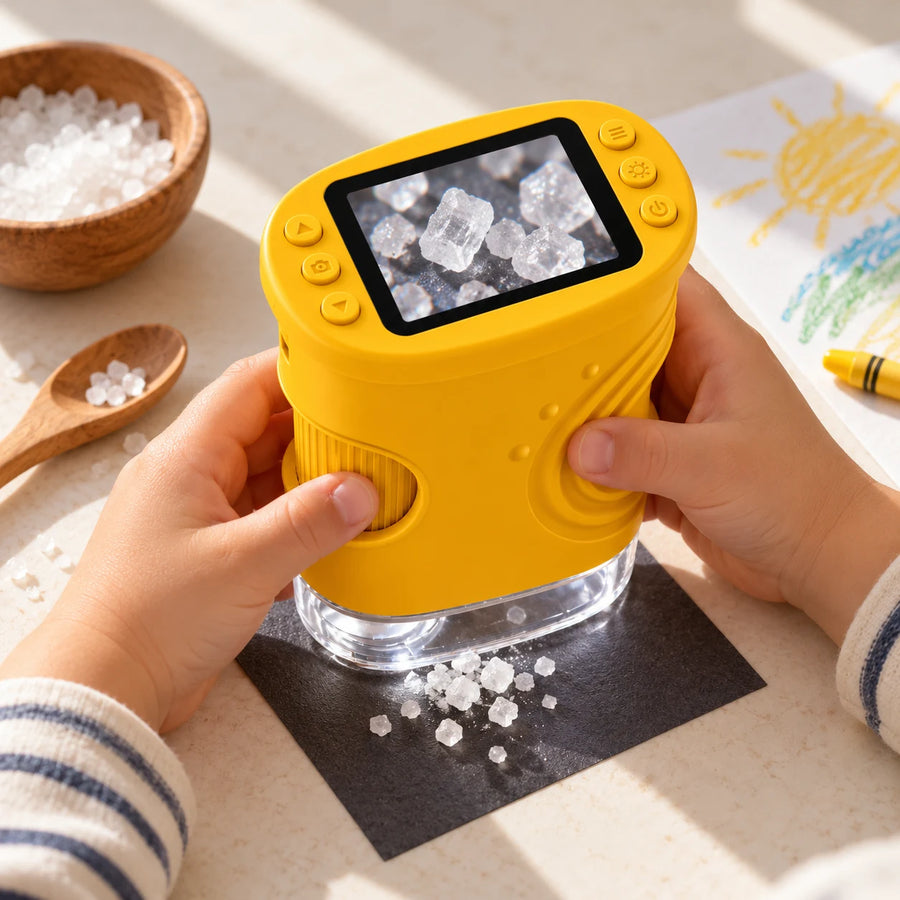
A rainy-day discovery
A pinch of salt or a piece of fabric can start a whole new conversation.

A backyard expedition
Collect fallen leaves and interesting stones, then compare their surfaces.

A discovery to share
Choose a color for each explorer, so siblings can follow their own questions.
LITTLE MOMENTS OF DISCOVERY
From “what is it?” to “come and look.”

Can’t go for a walk anymore without bringing half of it home 😂 Pinecones, bark, leaves… all lined up on the kitchen table waiting for their turn under the microscope.


Tried to get some sewing done. She wanted to look at every fabric scrap first. So, no sewing today.

Both kids wanted the same leaf at the same time. Had to make each of them their own pile. Still had to referee whose turn it was, but they were really into it!


Had the grandkids over and got it out after dinner. They started with the book on my side table. Then I had to have a go too. Fine print looks a lot different up close.

Yellow for one, purple for the other. They picked their own colors before I ordered. Very glad I didn’t try to make them share one.

He packed it in his little pouch for tomorrow. There are already three rocks in there that apparently “need checking.”


Saw this in my feed and figured why not. Took us a few tries to get the focus right, but now it’s the first thing my daughter grabs after school. Beach shells are next on her list.
More experiences
YOUR FIRST DISCOVERY
Three simple steps to a closer look.
Charge and prepare
An adult charges the microscope with the included USB cable. Insert a compatible microSD card if you want to save photos and videos.

Place, light, and focus
Choose a clean, dry sample. Hold the base steady over it, adjust the LEDs, and slowly turn the focus wheel.

Observe and capture
Look at the built-in screen. Take a photo or video, then try another object and compare what you see.

THE PRACTICAL DETAILS
Small enough for everyday exploring.
- Model
- 382
- Display
- 2.0-inch IPS display
- Camera / resolution
- 2 MP / 1920 × 1080
- Magnification
- 50–1000×
- Focus
- Manual side wheel
- Lighting
- 8 adjustable LEDs
- Capture formats
- JPG photos / AVI videos
- Battery
- 600 mAh rechargeable; approx. 2 hours of use
- Charging
- USB-C; approx. 2 hours
- Optional memory card
- Compatible 32GB microSD card; sold separately
- Dimensions (W × D × H)
- Approx. 8 × 5 × 10.5 cm
- Colors
- Yellow, purple, pink, white
- Adult guidance
- Recommended during setup and exploring
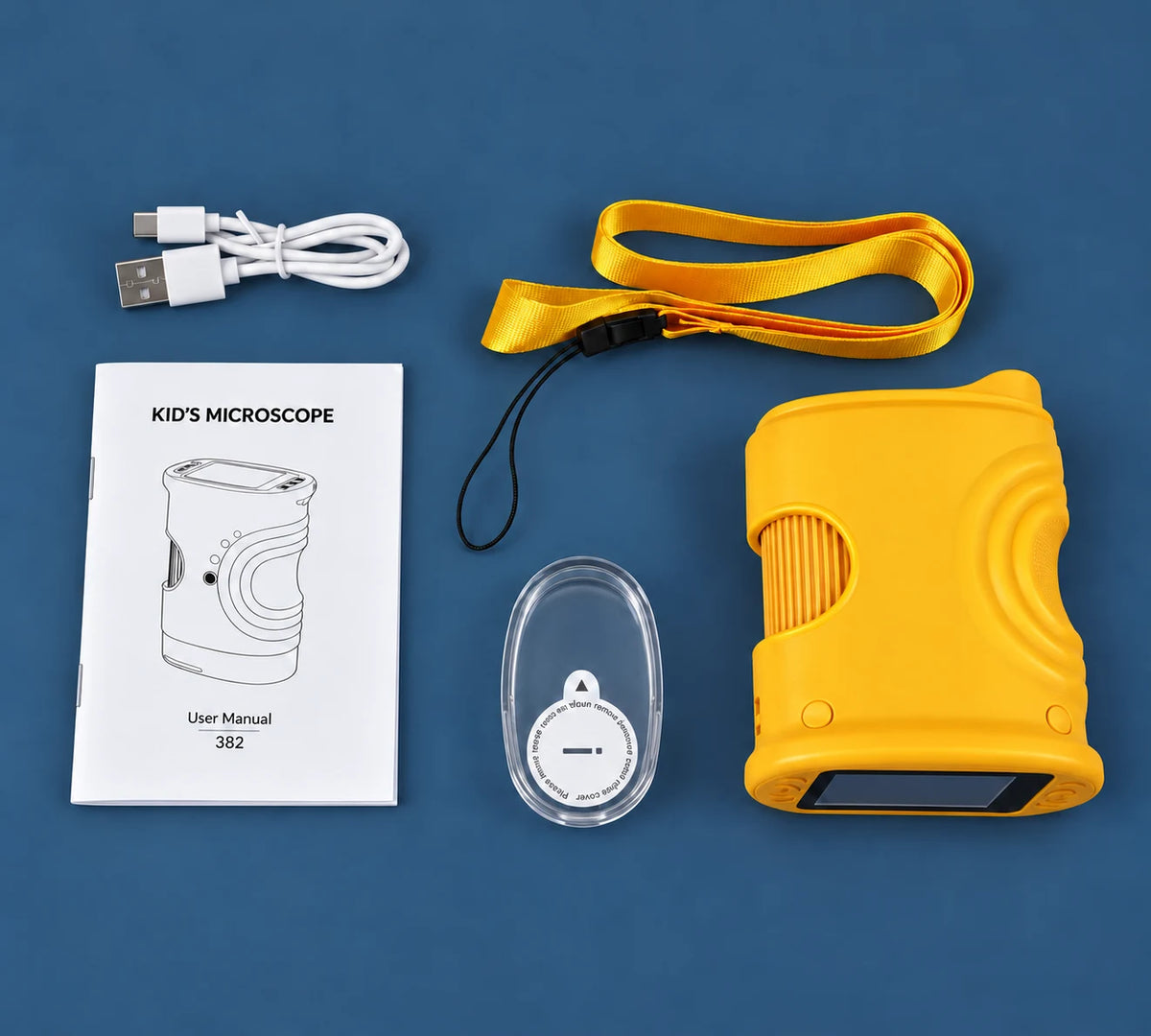
WHAT’S INCLUDED
A little kit. A lot to look at.
Your microscope arrives with its USB charging cable, lanyard, instructions, and clear protective cover. Add a compatible memory card in step 3 if you want to save photos and videos.
- 1 × NordiKidsScope microscope
- In your selected color.
- 1 × USB charging cable
- For charging the rechargeable microscope.
- 1 × lanyard
- For carrying the device with adult guidance.
- 1 × instruction booklet
- Read before first use.
- 1 × clear protective cover
- Protects the lens when stored.
A FEW THINGS YOU MAY BE WONDERING
Your NordiKidsScope questions, answered.
Should an adult help?
An adult should help with setup, charging, and small accessories. Explore together, especially while learning to hold the microscope steady and adjust the focus.
Does it need a phone or an app?
No app, software download, phone, or computer is needed to explore using the built-in screen. Compatible camera software is needed only if you choose to view the live image on a computer.
What can we look at?
Start with clean, dry everyday surfaces such as leaves, fabric, feathers, paper, and stones. Place the microscope close to the sample and focus slowly. It is a surface-viewing discovery tool, not a medical device.
Is the image always clear straight away?
No. Focus is manual. Hold the microscope steady, turn the side wheel, and adjust the lighting. Different surfaces and distances need different settings.
What does “up to 1000×” mean?
The specified magnification range is 50–1000×. The detail you see depends on the sample, focus, lighting, and viewing setup. Start with a steady base and turn the focus wheel slowly.
Is a memory card included?
Memory cards are sold separately. A compatible card is required to save photos and videos. Choose 0, 1, 2, or 3 compatible 32GB cards in step 3. If you have no suitable card at home, add one for each microscope you want to save with.
Can we view it on a computer?
Yes. Connect NordiKidsScope by USB to a compatible computer and use compatible camera software. Depending on your computer, you may need to download and install that software first. Check the manual for supported operating systems and setup instructions. For everyday exploring on the built-in screen, no app or computer is needed.
Can I choose different colors in a package?
Yes. Choose one color for each microscope. Every unit includes its own cable, lanyard, and instructions. Choose the number of memory cards separately in step 3, according to how many compatible cards you already have.
Is it waterproof?
Keep the device dry. Use dry samples and wipe the housing gently; do not immerse the microscope or charge it when wet.
How much is shipping?
US shipping is free with this offer. Any applicable taxes and final delivery estimates are shown at checkout.
THEIR NEXT “LOOK AT THIS”
Give curiosity somewhere to go.
Choose a color, pick your discovery set, and make room for a closer look at everyday things.
↑ Change selectionEach microscope includes a USB cable, lanyard, and instructions.
Free US shipping · Adult supervision recommended
MORE EVERYDAY DISCOVERIES
A closer look at the little moments.
4.7/5 · 23 reviews

Hannah W.
Corduroy firstShe picked purple and went straight for my corduroy pants. Getting the focus right took a few tries, but she didn’t give up. Four stars because she still needs me for that part.

Chris D.
The newspaper was a hitHe thinks the little printed dots are hilarious. Now he brings me every receipt and flyer in the house to compare.

Tanya R.
Works best on a tableThe wheel is easy to turn. Holding it still is the tricky part for my son. Resting it on the table over a coin works way better than holding everything in the air.

Jessica K.
Bark from the yardShe brought a chunk of bark in and there were crumbs all over the entryway. We put paper down now. The microscope itself is a really good size for her hands.

Owen M.
Found a feather on the walk homeWe tried it at his desk as soon as we got in. He kept sliding it around to see a different part. Quiet for twenty minutes, which never happens.

Beth S.
Everything gets inspectedEven the laundry basket got a turn. I honestly thought we’d use it for leaves and that’s it.

Priya N.
Flat shells work betterWe pulled out our shells from the beach. The round ones are a bit fiddly to get in focus, so we started with the flatter pieces. The kids loved the ridges.

Nicole H.
Just a buttonShe wanted to see the scratches on a button. Sat there turning it around for ages. Such a simple thing.

Robert G.
For my grandsonWe do better sitting down than walking around with it. Took a stone from the porch steps and he was hooked. Needs a grown-up nearby at his age.

Ashley F.
So much for groceriesHe was supposed to help me put the groceries away. Instead we spent ten minutes looking at the mesh bag the oranges came in.

Kim L.
Fits in his backpackIt goes in the front pocket of his backpack. We snap the clear cover back on first so the bottom doesn’t get scratched.

Amanda C.
She asked for pinkShe was so happy when she unwrapped it. We charged it that afternoon and spent the evening finding things to look at together.

Michael P.
Small turnsTook me a couple of minutes to figure out the focus too. Little turns, not big ones. Once I showed my son, he got it.

Elena T.
Easy to put awayOurs lives in the kitchen drawer with the cable. Doesn’t need a whole shelf, which in our house matters.
9 of 14 more reviews

